






Categories
- AI
- Architecture
- Art & Illustration
- Blog
- Business
- Company
- Corporate
- Culture
- Design Agencies
- Designer
- Developer
- E-Commerce
- Education
- Entertainment
- Events
- Experimental
- Fashion
- Film & TV
- Finance
- Food & Drink
- Games
- Health
- Hotel & Restaurant
- Institutions
- Lifestyle
- Magazine
- Mobile & Apps
- Music & Sound
- Newspaper
- Organization
- Other
- Personal
- Photography
- Portfolio
- Promotional
- Real Estate
- Resource
- SaaS Tool
- Social
- Sports
- Startups
- Technology
- Themes
- Web & Interactive
- Web Designer
- Web Developer
Tags
- AEO
- Animation
- App Style
- Background Images
- Bootstrap
- Bright
- Canvas
- Carousel
- Clean
- Colorful
- Design
- Drupal
- Fixed Navigation
- Flat Design
- Fluid
- Fullscreen
- Gallery
- Graphic design
- Grid
- Horizontal Layout
- Icons
- Illustration
- Infinite Scroll
- Interaction
- Interaction Design
- Menu - Horizontal
- Menu - Vertical
- Minimal
- One Page
- Parallax
- Photo & Video
- Photography
- Portfolio
- Responsive
- Responsive Design
- Retro
- Scrolling
- SEO
- Social Integration
- Sound-Audio
- Storytelling
- SVG
- Texture
- Transitions
- Typography
- UI design
- Vector
- Video
- Web Fonts
- WooCommerce
- WordPress
Quickmunch Food Restaurant SaaS Services
Metropolitan host
from United States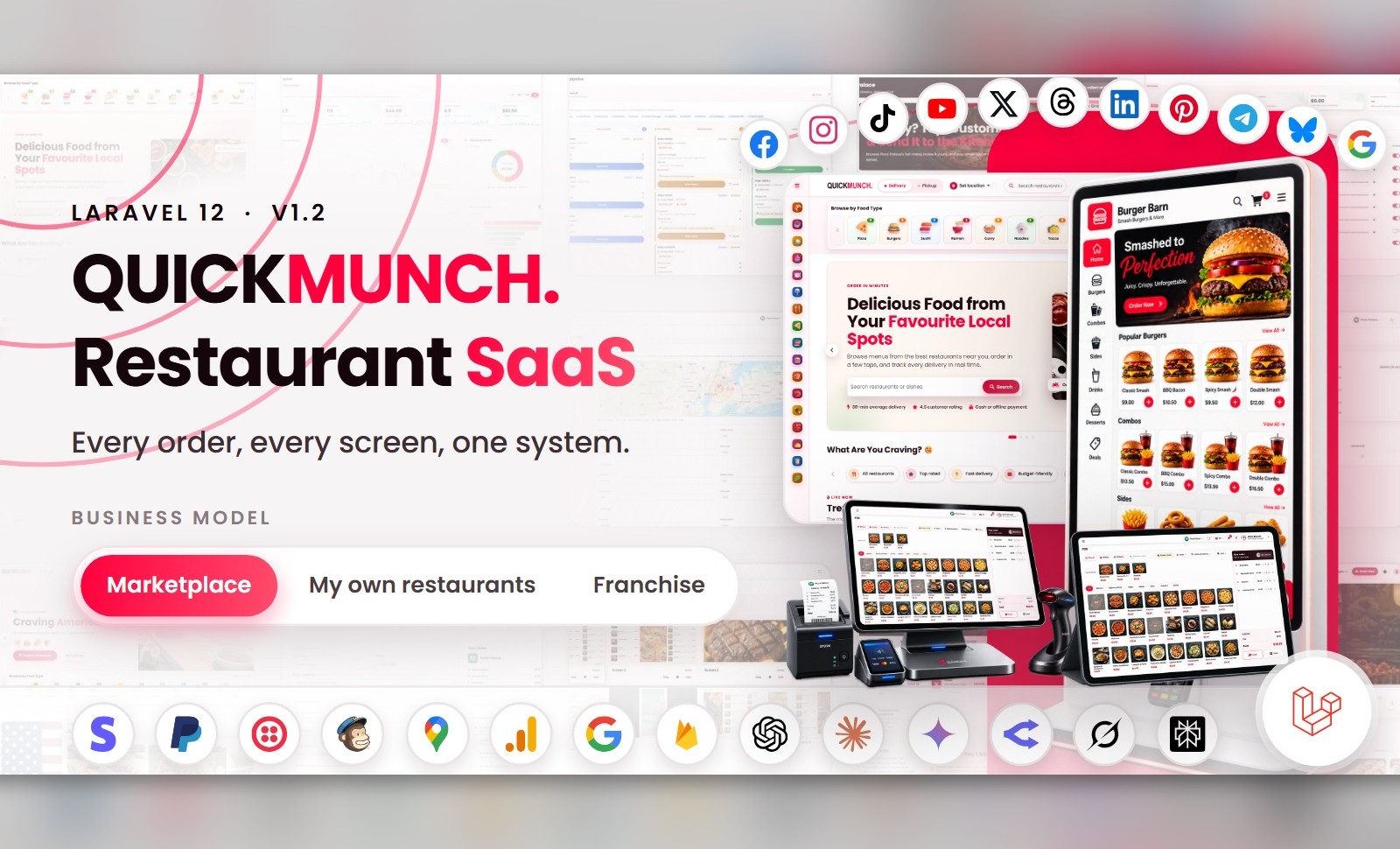
Quickmunch is a comprehensive and enterprise-grade multi-restaurant food ordering, delivery and point-of-sale platform built on the powerful Laravel framework. It is engineered to help restaurant groups, food delivery startups, franchise operators and marketplace owners create a fully functional and scalable online ordering business with ease. The platform offers a complete ecosystem including vendor management, real-time order tracking, kitchen and floor operations, self-service ordering and secure payment processing. With its modern UI/UX, optimised performance and modular architecture, Quickmunch ensures a seamless experience for administrators, restaurants, staff, drivers and customers. Run it as a commission marketplace, as the operating system for your own chain of venues, or as a franchise network billing royalties — one install, three business models, switchable from the admin panel. Whether you are launching a single venue or building a nationwide delivery marketplace, Quickmunch provides all the essential tools to manage menus, take orders, coordinate deliveries, monitor revenue and scale your business efficiently — all without requiring advanced technical knowledge. Why Quickmunch Is Different Most items on the market are one product: a storefront, or a POS, or a kitchen screen. Quickmunch is the whole restaurant stack behind a single installer — what would usually be five or six separate purchases, sharing one database, one menu and one admin panel: - Kitchen display system — a live order pipeline for the kitchen, updated in real time as orders arrive from every channel: online, POS, kiosk or table QR. - TV menu screens — digital signage rendered from the same menu data, so prices and availability change on the dining-room screens the moment you change them in the dashboard. - AI assistant & menu import — build a menu from a URL or a file and get in-dashboard help, with four selectable providers (OpenAI, Anthropic, Gemini, OpenRouter). Bring your own key and switch providers in settings. Talk to it: a Tap to talk button in the footer of the admin and restaurant dashboards listens, answers from live figures, opens pages by name and reads the answer aloud (Gemini or OpenAI speech, or the browser's own voice). - Three business models, one install — commission marketplace, your own chain of venues, or a franchise network billing royalties — switched from the admin panel with no code changes. - Complete online storefront — delivery, pickup and scheduled orders, guest checkout, coupons and loyalty, on a responsive, themable front end. - Full POS — counter point-of-sale in four till styles to choose from, with cash drawer, receipt printing and offline terminal support. - Self-order kiosks — a touchscreen ordering mode for in-venue kiosks, running from the same install. - QR table ordering & dine-in — guests scan and order from the table, and the order lands in the same kitchen pipeline as everything else. - Reservations & printable menus — a booking portal with table management, plus print-ready menus generated from the live menu data. Three Business Models, One Product Every install starts as a marketplace and switches whenever you like from the admin panel — every screen adapts to the model you run: - Marketplace — independent restaurants. You collect payments, pay each restaurant its share and keep a commission, with statements and payouts built in. - My own restaurants — one owner, many venues. All revenue is yours, consolidated. No payouts, no commission. - Franchise — each restaurant takes its own payments. You charge a royalty, invoiced on the subscription. How You Make Money (five income streams) - Commission on every order — set your percentage and the platform takes it off the top of each bill automatically; the restaurant’s balance queues to the next payout run, with statements for both sides (marketplace model). - Subscription plans — restaurants pay you monthly (or once, for lifetime tiers) to be on the platform: free, trial, monthly and lifetime plans with a feature matrix, billed as real Stripe / PayPal recurring agreements created by the app — no manual gateway dashboard work, ever — or as a prepaid term through any of the six hosted-page gateways. A restaurant can pay a plan instead of a percentage, or both — your pricing, your rules. - Sponsored ads — restaurants buy placements across your storefront (hero slide, home box, tall banner, listing banner and more), pay online through the same gateways, and the placement goes live — with admin pricing, approval and a revenue report; empty slots fall back to house promotion. - Royalty — in the franchise model each restaurant takes its own payments and you invoice a royalty on their sales, billed on the subscription. - Platform tax — charged on top of plans and ads, separate from each restaurant’s own diner tax; both configurable. Every stream lands in admin reporting: platform earnings, recurring revenue, ad revenue and payout statements. White-Label: Your Brand on All of It - Your logo, favicon and brand colour — one setting recolours the whole platform, storefront and dashboards alike - Your site name, pages, navigation, header and footer — nothing in the product names Quickmunch to your customers - Eight sellable services, each with its own switch: run storefront, POS, kiosks, QR cards, kitchen display, menu screens, printable menus, reservations and loyalty — all of it, or only what your market buys Customer Storefront - Six selectable homepage layouts (admin-chosen), cuisine and dietary classifications with dedicated landing pages, search and open-now / rating / price filters - Full menu with categories, item-options modal (sizes, add-ons, ingredient picker) and a live total; session cart with AJAX add / update / remove - Guest checkout — Stripe, PayPal, Mollie, Square, Paystack, Flutterwave, PayU, SSLCommerz, cash-on-delivery or offline / manual payment - Order scheduling, tips, service charge, per-restaurant tax, delivery zones, coupons and platform-wide deals - Real-time order tracking on a bundled Leaflet map with private, tokenised links - Installable web app (PWA) with native web-push order updates — no third-party push service - Reviews (delivered orders only), favourites, addresses, loyalty wallet and order history with one-click reorder - Table reservations from the storefront, with party size and special requests Restaurant Operations - Dashboard: a live “Right now” strip, KPI cards with sparklines, revenue and order trends, an out-for-delivery map and a client-locations map - Orders with validated status transitions, driver assignment and cancellation reasons - Reservations in calendar and list views; drag-and-drop floor plan with zones and per-table status - Menu: dishes with options, allergens and dietary attributes; categories; menu import with an AI-assisted draft flow; menu archive; upsell builder - Inventory: stock items with unit costs, movements, low-stock alerts and stock value - Customer book and a per-restaurant loyalty programme with a reward catalogue - Branches for multi-venue owners — each branch keeps its own takings and order count, and one click re-points the whole dashboard at it - An AI assistant that answers from the vendor’s own dashboard data, by text or by voice — bring your own provider key Quick Social: Every Restaurant Posts From Its Dish List - Ten networks from the restaurant dashboard: Facebook, Instagram, Threads, X, TikTok, YouTube, Pinterest, LinkedIn, Telegram and Bluesky — each branch connects its own accounts - A campaign composer that starts from a dish — name, price, description, photograph and the storefront link fill in — with text, picture and video posts, one preview per channel in that channel’s look, Write with AI, drafts, scheduling and Publish all - Native video publishing to YouTube, TikTok, Instagram Reels, Facebook Reels and Pinterest video pins, with each platform’s own settings - Campaign and video logs with every channel’s answer and one-click retries; archives with record pages that update or take down a post where the network allows; a calendar with day, week and month views and drag-to-reschedule - An Image studio (restaurant templates with the price, moods, adjustments, text and shape layers, saved at the picture’s own size) and a Video studio (trim, reframe, captions, colour, rendered on your own server with FFmpeg) - For the operator: the tool’s switch, the channels offered, one card per network app (provide it once, or let each branch register its own) and limits per branch — channels, campaigns per month, AI captions per month Devices & Printing - POS in four styles to choose from, with parked tickets, quick keys, table picker, cash drawer and shift reports - Card, cash or payment QR the guest scans — split payments, refunds and voids with a name against them, and a shift report that reconciles - Kiosks and QR scan-to-order at the table — the guest orders and pays on their own phone, and the order already knows where it sits - Kitchen display (KDS): every channel lands on one colour-coded board, tickets age on screen, and every cleared ticket carries a name - TV screens (digital menu boards): pair a display with a code and it pulls the live menu — six presets, portrait or landscape, scheduled by daypart - The boards themselves — spotlight, menu + media and slideshow layouts composed in the dashboard, with video columns playing beside live menu prices - 24 printable menu designs — six looks with four layouts each, from bi-folds and tri-folds to gatefolds, poster boards and single pages — laid out from the live menu on exact A4, front and back, with crop marks and fold guides for the print shop - Drag-and-drop receipt designer, per-device settings and idle lock - Staff PIN security: one tap locks the terminal, repeated wrong PINs lock it out, and a full audit trail sits behind every action Staff & Reports - Scoped staff roles — kitchen, host, waiter, manager — each with its own screen set - Role permissions, PIN lock & handover, cash-drawer accountability - Seven vendor reports: sales, menu performance, reservation trends, staff performance, customer insights, operations and kitchen efficiency Driver / Rider - Delivery zones as circular tiers with their own fee and minimum order — checkout picks the smallest tier that covers the address - Assigned deliveries, status updates and a read-only earnings tally - Availability toggle and live position on the vendor’s delivery map Super-Admin - Restaurants, users, roles & permissions, classifications, deals, loyalty and a platform-wide menu and media library - Money: payments & gateways, plans, subscriptions, payouts, royalty invoices, platform earnings, recurring revenue, sponsored ads and ad revenue - Website & content: CMS pages, blog with comments, header / navigation / footer editor, homepage layouts and SEO controls - Messaging: transactional email with editable templates, SMS (Twilio), push broadcasts, automated drip sequences, a subscriber list with optional Mailchimp sync, and a contact inbox - Design templates, audit log, platform reports, maintenance mode & backups What’s Included - Full Laravel source for the storefront, vendor, staff, driver and admin areas - Web installer, database schema and seeded demo data - The application ships as a single quickmunch.zip — upload one file to your host and extract it there, instead of transferring thousands of files over FTP - 126-page HTML documentation that filters by reader role and business model — every screen in the product has a page - Nine-language UI (English, Spanish, French, Dutch, Russian, Hindi, Bengali, Urdu, Arabic) with generated RTL stylesheets for Arabic and Urdu - 100% local assets: fonts, icons, images, charts and maps all self-hosted - Editable CSS/JS sources with a one-command build (npm run build) — the built files are included, so nothing needs building to run Server Requirements - PHP 8.2+ with PDO, GD, mbstring, openssl, fileinfo - MySQL 5.7+ (8.x supported) / MariaDB 10.4+ - Apache (mod_rewrite) or Nginx; HTTPS recommended (payments, push and the installable app want a secure address) - FFmpeg on the server — optional, used by the Video studio only Browser Compatibility - Chrome and Edge 111+, Firefox 113+, Safari 16.4+, and the current Chrome/Safari on Android and iOS - Responsive from 360 px phones through tablets to desktop; the customer app installs to the home screen - Right-to-left layouts ship as generated stylesheets, so Arabic and Urdu render natively rather than being flipped at run time - Internet Explorer is not supported Third-Party Integrations (optional, off by default) A default install runs with every integration switched off; each one activates only when you add your own key in the admin panel: - Online payments — Stripe and PayPal on your own checkout page, plus six hosted-page gateways (Mollie, Square, Paystack, Flutterwave, PayU India, SSLCommerz) that take the payment on the provider's page and bring the customer back; all with refunds from the order screen. Cash and offline / manual payment work with no keys at all - SMS — Twilio, behind a provider-agnostic settings screen - Email marketing — optional Mailchimp audience sync (the subscriber list lives in your own database either way) - AI — bring your own provider key (e.g. OpenAI / Anthropic) for the vendor assistant and AI menu import; you must provide your own privacy notice per your provider’s terms - Maps — bundled Leaflet with OpenStreetMap by default; optional premium tile keys Support & Updates - Documentation covers install, updating, configuration and every screen, with a troubleshooting guide, FAQ and glossary - Support is provided through the item support form on this page, on the marketplace you bought it from Credits (all bundled locally, license-compliant) - Bootstrap (MIT), Font Awesome 5 Free (CC BY 4.0 / SIL OFL / MIT) - ApexCharts, Leaflet, SweetAlert2, Flatpickr, FullCalendar, Choices.js, FilePond, Quill, Cropper.js, qrcode, interact.js, Panzoom, noUiSlider, Pickr, html2canvas (MIT) - All images are just used for DEMO purposes only. They are not part of the template and NOT included in the final purchase files. The download ships neutral placeholders in their place — replace them with your own licensed imagery before going live.
Final Judge's Score
Design
Usability
Development

Yanice Yang
Design & Product Lead - AtlasNova.AI


Alyona Lillo
Web Designer



Di Xia
Senior Designer - Freemind Seattle


Darya Kovaleva
Web Designer

Mardji Ramus
Web Designer

Yitian Li
UX Interaction Designer - Google


Anastasia Nikolaeva
Web Designer

Sara Kushkova
Designer & Art Director
Quickmunch Food Restaurant SaaS Services
needs your vote.
Design - 1/3
Can engage the users with considered colors, typography and imagery?
-
1-4Not good enough
-
5It's ok
-
6Good
-
7Very Good
-
8Great
-
9Excellent
-
10Perfect
Only Pro User